


01
Find your layout.
Choose a Clicky template that gives your logo and details the right place.
Explore the examples
Email signatures. Personal by design.
Beautiful email signatures, animated visuals, and every detail that makes your brand yours.
See a logo come aliveYour signature.
At home in your inbox.
 Gmail
 Outlook Mobile previews
AI animation · Real Clicky results
A little movement changes everything. Explore real logos brought to life in Clicky, then see them inside an email signature.
Make something memorable

Hi Alex,
Thought you might like what we’re working on.
Let’s make something great.
Red fox, with an entrance of its own. A real logo reveal created in Clicky.
Originals stay yours. You choose what to use.Every animation here was made with Clicky. Select an example to explore the result, replay it, or try it against a different background.
How Clicky works
From a blank signature to a better introduction. Three simple steps, all in your hands.
Choose a Clicky template that gives your logo and details the right place.
Explore the examplesYour colors, your links, your latest announcement. See every change as you make it.
Try a little changeCopy your signature and follow the guide for Gmail, Outlook or your email client.
See how it gets thereSignature inspiration
Real Clicky layouts. Logos with a life of their own. Find your starting point.


Live signature editor demo
Seven ways to make your mark. Change a detail, switch the layout, add a little personality. Your signature comes together as you go.
 Signature studioInteractive demo
A photo. A character. A little personality.
Choose an original, then explore its real Clicky result. Try More tools for Mask and Enhance.
Choose your image firstPrepared imageReal Clicky results · Demo timing
Same personality. A different point of view.
This demo explores three arrangements. Find the full template collection inside Clicky.
The details behind your next conversation.
Fine-tune the things that make it yours.
Color, typography and spacing. Small decisions make a recognizable signature.
Keep your logo in the conversation.
Your own logo can do more. See real Clicky animations in the showcase.
See it moveHi there,
Great things start with a conversation.
Let’s make something together.
Warm regards,


Enhance with AI
Give your photo or character a different feel. Choose a portrait style or describe your own direction, with optional reference images to guide the result.
Choose a static photo or character from your media library.
Pick a style, write an instruction or add up to two references.
Your result is saved alongside your original.
Real result created with Enhance with AI. Uses AI credits; your original stays safe.
Your media and analytics
Your images and animations stay close. Your signature activity stays clear. Return to what you made, see what people follow and keep improving.
Your media, together.

Keep uploads, GIFs and generated results in one place. Browse by type, revisit your image history, preview, download and choose what comes next.
A clearer view of your signature activity.
Compare activity over time, discover your most-followed links and explore signature, location and device breakdowns. Export a CSV when you need it.
Analytics availability depends on your plan. The sample above is illustrative, not measured customer activity.
Inside Clicky
Design your signature. Look after your team. Understand what people follow. It all lives here.
Work on your image, layout, details and brand in one place, with your signature beside you as you design.
Keep people, roles and signature access together. Organize your team without losing the personal details.
Explore signature activity, clicks and link performance. Find the details that help you keep improving.
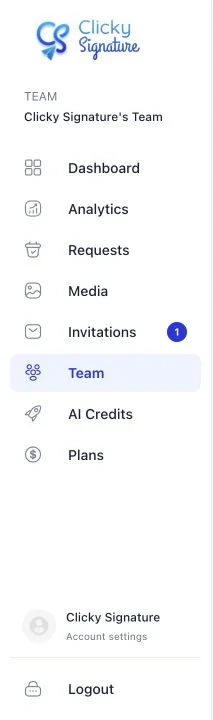



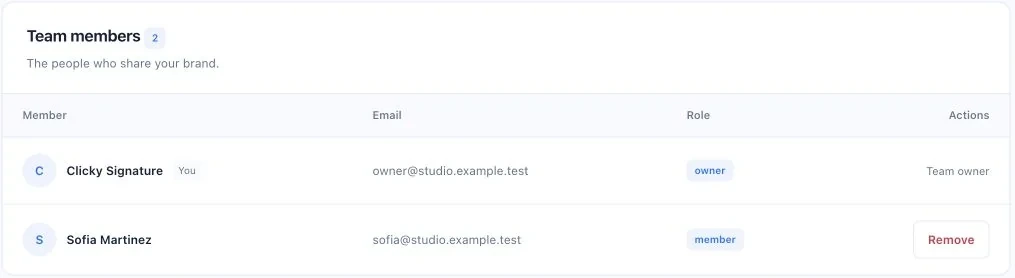


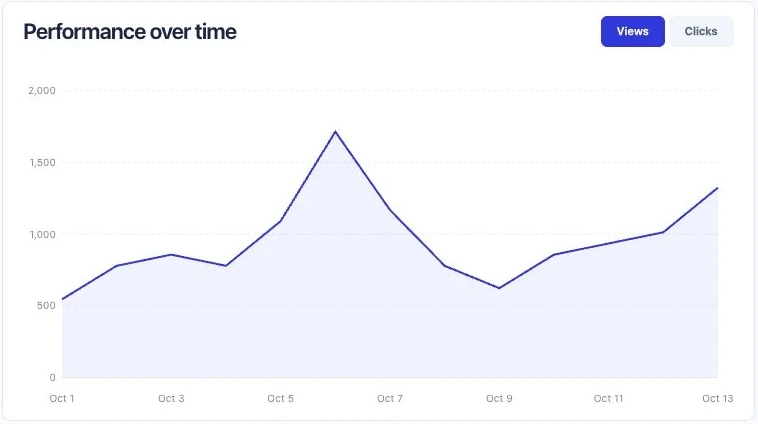
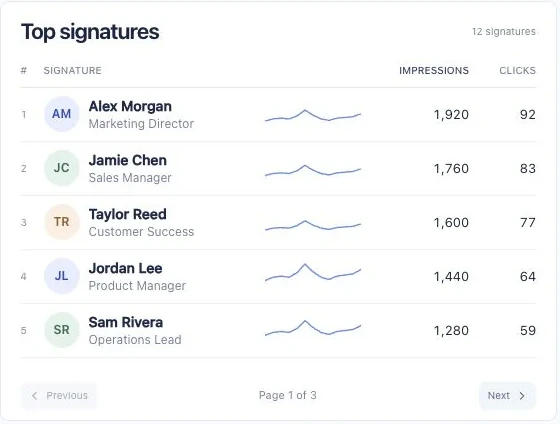

Profile interface recreated for this preview. Team and analytics use actual Clicky screens with synthetic demo data. Features depend on your plan.
Team signature management
Bring your people, roles and signatures together. Keep a consistent brand while every introduction stays personal.
From Clicky to your email
Keep using the inbox you love. Clicky helps your signature feel at home there.
Save your design, then copy its email-ready HTML.
Install in Gmail or Outlook with the instructions beside your signature.
Your signature is ready for your next conversation.
Eligible Google accounts can also connect and apply a Gmail signature. Plan and setup requirements apply.
Read the Gmail installation guide or the Outlook installation guide.
Gmail: Settings → See all settings → General → Signature. Create a signature, paste, then save your changes.
Plans for your next chapter
Find your fit, with 3 days to try Clicky. Your signatures, your images, a little magic of your own.
Your trial includes 2 Standard logo animations and 5 AI-enhanced images in total.
Trial eligibility and payment details are shown when you sign up.
Your own signature studio.
$8/ month
5 signatures
Room for a growing team.
$20/ month
50 signatures
For your whole organization.
$100/ month
1,000 signatures
Animation counts use Standard. Animation and image credits are separate balances that refresh each billing month; unused monthly credits do not roll over. Trial allowances are one-time, shared with your team, and expire when the trial ends. One trial per account. Taxes extra.
Tell us about your team. We’ll find the right fit.
Yes. Every plan offers a 3-day trial for eligible new accounts. When our no-card offer is active, you can begin without choosing a plan or entering payment information; the trial ends without a charge. Otherwise, choose a plan and add your card: it renews automatically after 3 days unless you cancel. The current offer is shown at sign-up. The trial includes 2 Standard logo animations and 5 Enhance with AI images in total, shared with your team. Trial allowances expire when the trial ends; monthly allowances begin with your paid subscription. One trial per account.
ClickySignature is an online email signature generator for professionals and teams. Create a signature with your contact details, logo and social links, add animated logos or AI-enhanced images, and install it in your email client. Team management and analytics are available on eligible plans.
Yes. Create and copy your signature in Clicky, then follow the installation guide for your version of Gmail or Outlook. Gmail, Outlook and mobile previews help you design; send a test email in your actual client to check the final result. Mobile apps can have different signature settings.
Yes. Upload a GIF, add a frame effect, or animate a logo or portrait with AI. Choose a logo reveal or Bring to life, preview the result, and apply it to your signature. Your original image stays in your media library.
Animation support varies by email client and version. Some clients may show a still frame instead of playing a GIF. Send yourself a test email and check the clients your recipients use; the editor preview cannot guarantee identical rendering everywhere.
Yes. Keep your team’s signatures together, organize them into groups and use a master signature to keep your branding consistent. Team features depend on your plan.
No. Clicky helps you create, manage and install your signature. You keep sending emails from the email client you already use.
Eligible accounts and plans can use Connect to apply signatures through the supported Google integration. Availability depends on your plan, permissions and Workspace setup. You can also copy a signature and follow the manual Gmail or Outlook installation guide.
The current Essential, Pro and Max plans include separate animation credits and image credits. Standard animations use one animation credit; other animation options can use more. One Enhance with AI generation uses one image credit. Monthly credits refresh at billing renewal, and unused monthly credits do not roll over. Existing subscriptions and purchased balances can have protected terms; check your account for its exact allowances.
Of course. Return to the editor whenever your photo, role, links or brand changes. Save your design and follow the sharing or connection options for your email account.
A signature that feels like a hello


